> ## Documentation Index
> Fetch the complete documentation index at: https://vendo-mintlify-24213046.mintlify.site/llms.txt
> Use this file to discover all available pages before exploring further.

# What is Vendo

> Your users build their own features inside your product: screens on their real data pinned into your pages, automations that run on a schedule, their own accounts connected — all through your own API, as them.

Vendo lets your users add new features to your product and customize it to how
they work. They describe what they want in plain language, and an agent builds
it inside your app — through your own API, as them.

A screen on their real data, pinned into one of your pages. A digest that runs
every Friday with nobody there. Their own Gmail or Slack, working inside your
product. They build these themselves, and they keep them.

Answering questions is the least of what it does.

## What it looks like

<Columns cols={2}>
  <Frame caption="Ask, and a working screen shows up in your product.">
    <video className="vendo-loop" width="1200" height="750" poster="/images/ui/hero-generated-view.png" autoPlay loop muted playsInline aria-label="In the Maple demo bank, someone types Show me where my money went this month. The agent reads their spending, and a Spending this month screen builds in place: a donut of $9,381.14 in total spend over a ranked list of categories, Housing at 51% and $4,786.40 first, with a Pin to dashboard button in its header.">
      <source src="https://mintcdn.com/vendo-mintlify-24213046/6bEQTFgPEqe5pjD7/images/ui/loop-view-arrival.mp4?fit=max&auto=format&n=6bEQTFgPEqe5pjD7&q=85&s=3faec2dbd0a3bf02bce151d673fc9670" type="video/mp4" media="(prefers-reduced-motion: no-preference)" data-path="images/ui/loop-view-arrival.mp4" />
    </video>
  </Frame>

  <Frame caption="It asks before it writes anything, then acts as you.">
    <video className="vendo-loop" width="1200" height="750" poster="/images/ui/hero-approval.png" autoPlay loop muted playsInline aria-label="Someone types Move $200 from my checking account to savings. The write stops for approval: a card asks Send $200.00 to Maple Savings ··8820, notes that it sends now as you and can't be undone, and offers Approve and Deny. Approve resumes the call, and the thread answers Done, $200.00 moved to savings, Maple Checking is now at $9,212.20.">
      <source src="https://mintcdn.com/vendo-mintlify-24213046/6bEQTFgPEqe5pjD7/images/ui/loop-approval-transfer.mp4?fit=max&auto=format&n=6bEQTFgPEqe5pjD7&q=85&s=ce3a27688f2173cbc2e882dc8d558c3f" type="video/mp4" media="(prefers-reduced-motion: no-preference)" data-path="images/ui/loop-approval-transfer.mp4" />
    </video>
  </Frame>
</Columns>

The path a request takes to get there is in
[how Vendo works](/product/how-it-works).

## Screens that stay

Ask for something to look at and the agent writes a screen instead of describing
one. It is a real React component running on live data from your own API, in
your fonts, colors, and radii.

The screen can stay. Put a slot in one of your pages and every finished screen
grows a button that puts it there. Press it and the screen holds that spot,
re-running on every open, so it opens on today's numbers.

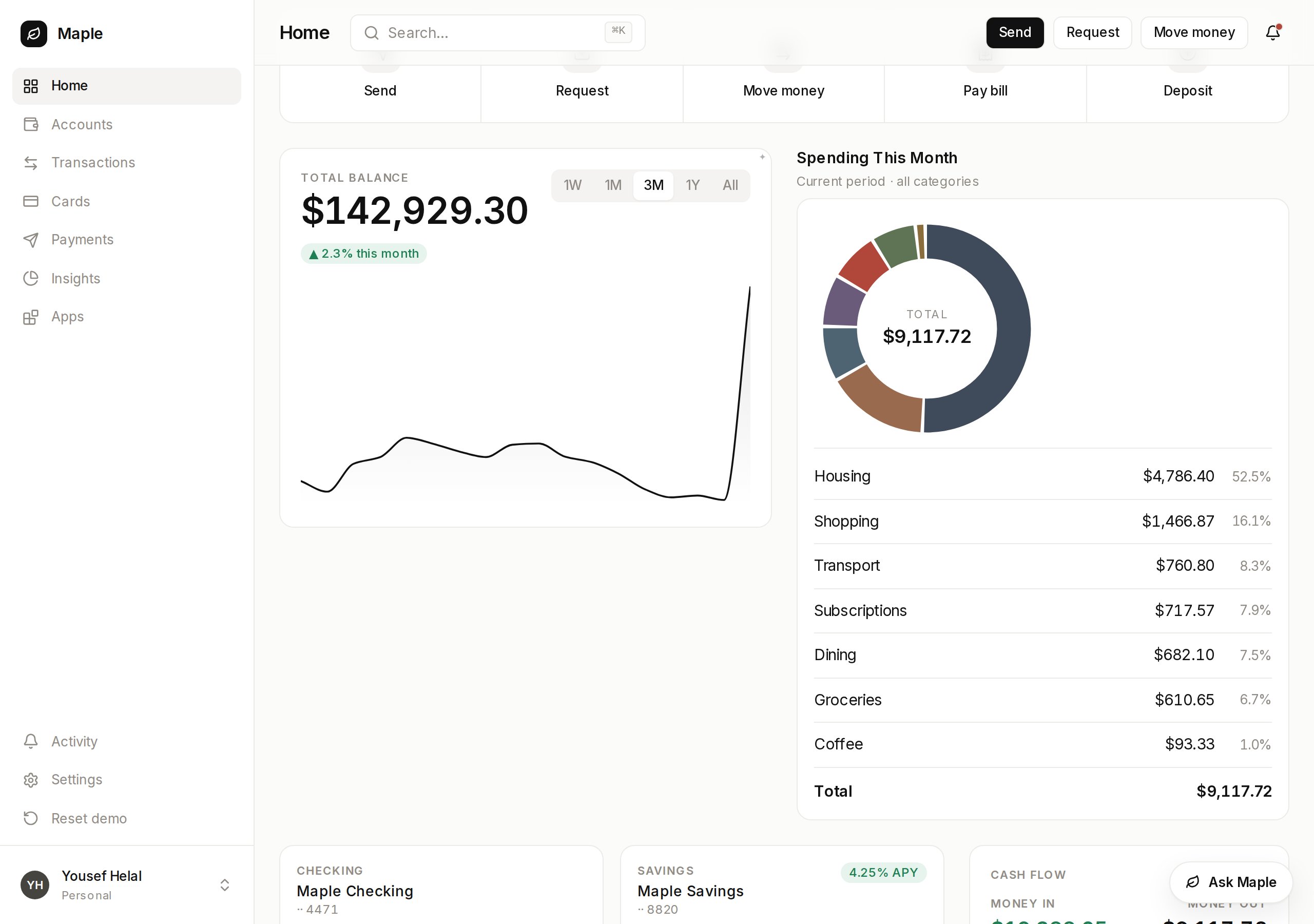
<Frame caption="Maple's own overview page. The spending card is the one a user asked for.">
  <img src="https://mintcdn.com/vendo-mintlify-24213046/6bEQTFgPEqe5pjD7/images/maple/slot-in-page.png?fit=max&auto=format&n=6bEQTFgPEqe5pjD7&q=85&s=22e23564a2d5ff806d61137871c57167" alt="Maple's overview page with its own quick actions, balance chart, and account tiles, and a generated spend by category card holding the slot beside them" width="1280" height="900" data-path="images/maple/slot-in-page.png" />
</Frame>

`vendo init` reads your brand out of your app into `.vendo/theme.json`. Register
your own components and a screen renders your real UI, not the built-in kit.

## What they build from

Whatever a user builds is made of these three things.

<div className="direction-cards">
  <CardGroup cols={3}>
    <Card title="Your API" href="/howto/tools" img="https://mintcdn.com/vendo-mintlify-24213046/6bEQTFgPEqe5pjD7/images/cards/capability-api.svg?fit=max&auto=format&n=6bEQTFgPEqe5pjD7&q=85&s=f321ce502f1ca7a05f544b697db9b9d7" width="640" height="400" data-path="images/cards/capability-api.svg">
      One command reads your OpenAPI, tRPC, server actions, or routes and writes
      the tool set everything runs on.

      API tools →
    </Card>

    <Card title="Their accounts" href="/capabilities/connected-accounts" img="https://mintcdn.com/vendo-mintlify-24213046/6bEQTFgPEqe5pjD7/images/cards/capability-accounts.svg?fit=max&auto=format&n=6bEQTFgPEqe5pjD7&q=85&s=35b62ddb6164b7de7755e08d7b837cb9" width="640" height="400" data-path="images/cards/capability-accounts.svg">
      Each user connects their own Gmail, Slack, or GitHub once, and later calls
      run as them.

      Connected accounts →
    </Card>

    <Card title="On a schedule" href="/capabilities/automations" img="https://mintcdn.com/vendo-mintlify-24213046/6bEQTFgPEqe5pjD7/images/cards/capability-schedule.svg?fit=max&auto=format&n=6bEQTFgPEqe5pjD7&q=85&s=401d197198e3932694751e564cbd1da6" width="640" height="400" data-path="images/cards/capability-schedule.svg">
      A user says when, and the same tools fire on a cron or an event.

      Automations →
    </Card>
  </CardGroup>
</div>

## It acts as the signed-in user

Every call runs inside your process, through your routes and your auth, carrying
the asking user's own identity. Vendo's servers never call your API. The agent's
hands are a fixed set, and a user can build only what they could already do by
clicking.

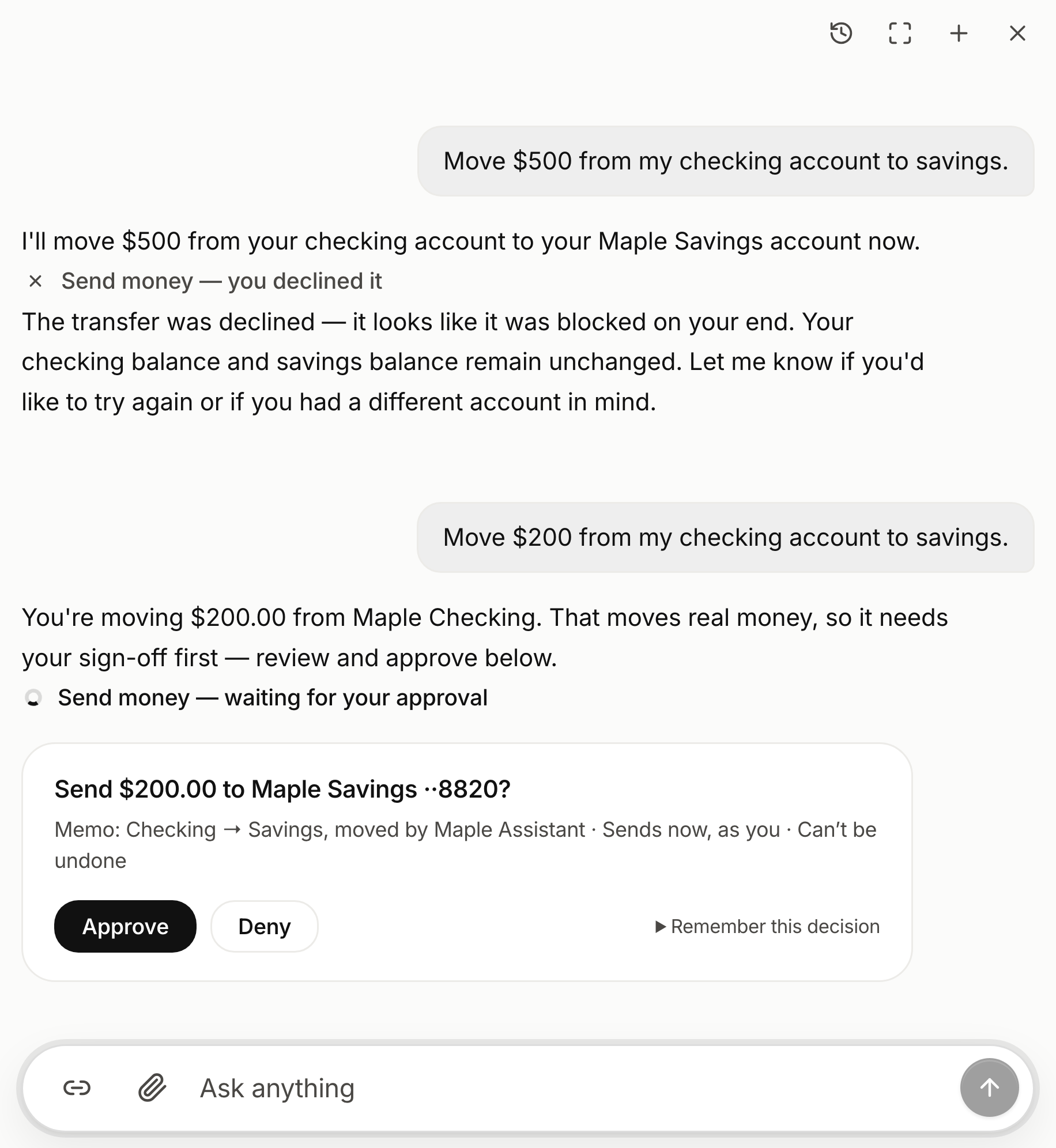
Reads go through. Writes and deletes stop and ask, quoting the exact request
rather than the tool's name, and every call writes an audit line either way.

<Frame caption="The ask names the exact request. Every call keeps its own line, approved or not.">
  <img src="https://mintcdn.com/vendo-mintlify-24213046/6bEQTFgPEqe5pjD7/images/ui/hero-activities.png?fit=max&auto=format&n=6bEQTFgPEqe5pjD7&q=85&s=09955b5fd049cfc4e5976d3f224b5f98" alt="The Maple demo bank's assistant panel. An earlier request to move $500 to savings carries the line Send money — you declined it; the next one carries Send money — waiting for your approval, and under it a card asks Send $200.00 to Maple Savings ··8820, noting it sends now, as you, and can't be undone, with Approve and Deny beneath" width="916" height="996" data-path="images/ui/hero-activities.png" />
</Frame>

## Start where you are

The embedded surface is the step after that, and `vendo init` asks which of
these you are doing and wires that one.

<div className="direction-cards">
  <CardGroup cols={3}>
    <Card title="Vendo's Full-Stack Agent" href="/product/quickstart" img="https://mintcdn.com/vendo-mintlify-24213046/6bEQTFgPEqe5pjD7/images/cards/direction-product.svg?fit=max&auto=format&n=6bEQTFgPEqe5pjD7&q=85&s=734c817335cbbff5f3bcc9f34aafd2d4" width="640" height="400" data-path="images/cards/direction-product.svg">
      Vendo runs the loop and renders screens in your brand.

      `<VendoProvider>`

      Quickstart →
    </Card>

    <Card title="In your existing agent" href="/existing-agent/quickstart" img="https://mintcdn.com/vendo-mintlify-24213046/6bEQTFgPEqe5pjD7/images/cards/direction-existing-agent.svg?fit=max&auto=format&n=6bEQTFgPEqe5pjD7&q=85&s=83a2a6a96cb7482e092c90d97c0f5128" width="640" height="400" data-path="images/cards/direction-existing-agent.svg">
      Keep your loop. Vendo adds tools and renders the result.

      `vendoTools(vendo)`

      Quickstart →
    </Card>

    <Card title="From outside agents" href="/outside-agents/quickstart" img="https://mintcdn.com/vendo-mintlify-24213046/6bEQTFgPEqe5pjD7/images/cards/direction-outside-agents.svg?fit=max&auto=format&n=6bEQTFgPEqe5pjD7&q=85&s=9dac332c5e9d005813019606903cd76b" width="640" height="400" data-path="images/cards/direction-outside-agents.svg">
      Your own agent, acting as the signed-in user.

      `createVendo({ mcp: true })`

      Quickstart →
    </Card>
  </CardGroup>
</div>